
Your shopping cart is empty!

-740x740.webp "Backup & Restore Manager - Prestashop Addons")
-740x740.webp "Backup & Restore Manager - Prestashop Addons")
-740x740.webp "Backup & Restore Manager - Prestashop Addons")
-740x740.webp "Backup & Restore Manager - Prestashop Addons")
%20(1)-740x740.webp "Backup & Restore Manager - Prestashop Addons")
-740x740.webp "Backup & Restore Manager - Prestashop Addons")
-740x740.webp "Backup & Restore Manager - Prestashop Addons")
Automate complete database and file backups for your online store with the PrestaShop backup module, and restore your shop in minutes. Developed for merchants who can't afford to lose a single order, product, or customer record.

Running a store means running a risk: a bad update, a failed migration, a hacked admin account, or a hosting failure can wipe out months of product data, orders, and customer records in seconds. The PrestaShop backup module by Knowband exists to make that risk manageable. This module takes complete, scheduled backups of your database and store files, sends them automatically to the storage platform of your choice, and if the worst happens, restores your shop even when the PrestaShop store itself is broken or the server is brand new.
Unlike basic backup scripts that break on shared hosting timeouts, this PrestaShop backup addon uses a chunked, resumable engine that survives PHP execution limits, so backups complete reliably regardless of store size. Merchants can define reusable storage platforms, for example, local server, FTP/SFTP, Amazon S3 and S3-compatible services (MinIO, Wasabi, Backblaze, Scaleway), Google Cloud Storage, or OAuth-based clouds like Google Drive, Dropbox, OneDrive and Yandex, and map them into any number of backup profiles, each with its own schedule, retention rules, and scope.
Whether you're safeguarding a growing catalog before a major PrestaShop update, meeting a client's data-protection requirement, or simply building good backup hygiene into your store operations, this module removes the manual guesswork and gives you a system you can trust.
| 1 |
Automated Scheduled Backups
Automated Scheduled Backups is used to run complete database-and-file backups on a recurring schedule without manual effort. Store admins can use this feature to set a nightly or weekly cron job once and never think about backups again, while still getting full visibility into every run. |
| 2 |
Chunked, Resumable Backup Engine
Chunked, Resumable Backup Engine allows the store owner to break large backup jobs into small, timeout-safe steps that resume automatically from where they left off. Store admins can use this feature on shared or budget hosting, where long-running scripts normally fail, without upgrading their hosting plan. |
| 3 |
Multi-Platform Cloud Storage Integration
Multi-Platform Cloud Storage Integration is used to push backups directly to 13 supported storage platform types, including S3 + S3-compatible (MinIO/Wasabi/Backblaze/Scaleway), WebDAV, ownCloud/Nextcloud, Google Cloud Storage, Google Drive, Dropbox, OneDrive, pCloud, Box and Yandex. Store admins can use this feature to keep backups off the production server entirely, so a compromised or crashed host doesn't take the backup down with it. |
| 4 |
Reusable Backup Profiles
Reusable Backup Profiles is used to define named backup jobs (type, storage platform, retention, scope, and daily limit) independently of the storage account itself. Store admins can use this feature to run different backup strategies for different needs, such as a lightweight daily database-only job and a weekly full backup, without duplicating storage setup. |
| 5 |
Selective Backup Scope (Specific Tables & Files)
Selective Backup Scope is used to include or exclude exact database tables and file paths from a backup in a PrestaShop store. This helps shrink backup size and run time by skipping non-essential tables, log files, or bulky media folders that don't need to be restored. |
| 6 |
Compression, Split & AES-256 Encryption
This feature compresses archives, splits oversized backups into parts, and encrypts sensitive data at rest. It helps store admins stay within file-size limits on large catalogues and meet security requirements for storing customer data off-site. |
| 7 |
Retention Rules & Safe-Flagging
Retention Rules & Safe-Flagging is used to automatically clean up old backups by count and by age while permanently protecting copies that are flagged to be kept. Store admins can use this feature to stop storage costs from growing unchecked, while manually locking specific backups, like a pre-launch snapshot, from ever being deleted. |
| 8 |
Independent Standalone Restore Script
An independent standalone restore script is used to restore a store's database and files without any working PrestaShop installation. Store admins can use this feature on a hacked, corrupted, or brand-new server, opening a single password-protected file in a browser to rebuild the entire shop from a backup archive. |
| 9 |
FTP-Credential Restore Fallback
FTP-Credential Restore Fallback is used to write restored files over FTP when local folder permissions block a direct write. Store admins can use this feature to complete a restore successfully even on hosts with restrictive file permissions, instead of the process failing outright. |
| 10 |
Files-Map Storage Analysis
Files-Map Storage Analysis is used to visualise exactly which folders and files are consuming the most backup space. Store admins can use this feature to identify and exclude bloated, non-essential directories in one click, cutting backup size and time significantly. |
| 11 |
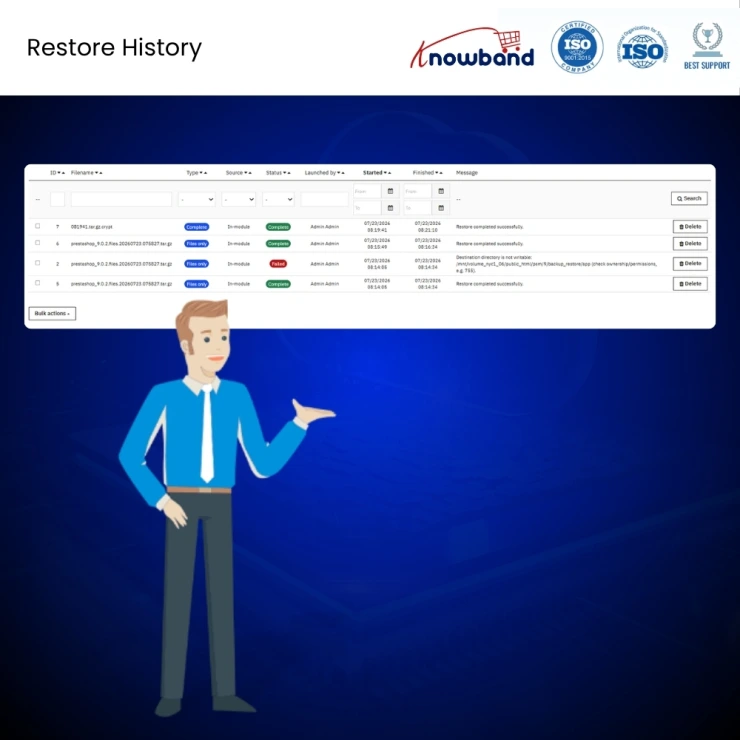
Restoration History Log
Restoration History Log is used to keep a full audit trail of every restore performed: backup used, type, timing, and outcome. Store admins can use this feature to satisfy internal audit or legal requirements and to troubleshoot a restore that didn't go as expected. |
| 12 |
Data-Integrity Self-Exclusion
Data-Integrity Self-Exclusion is used to guarantee the module's own tables and files are never touched during a restore. Store admins can use this feature with full confidence that a restore can never accidentally wipe out the backup tool, its settings, or its history. |
Knowband, a leading name as an eCommerce development company, provides Prestashop plugin development services to enhance the functionality of your eCommerce stores. For providing Prestashop plugin development, we have hired experienced Prestashop developers who work with full dedication to offer Prestashop development and support services.
If there is a feature you want on your Prestashop store, chances are that a Prestashop plugin will allow you to do it, if you don't find any such plugin you can always contact us for your custom plugin development requirements.
 Sale
Sale
Having mobile apps for your site can increase your sales and customer ...
$199.99 $249.99
Sale
Prestashop Maintenance page customizer allows to create several custom...
$79.99 $99.99
Sale
Prestashop Custom CSS and JS allow admin to add custom CSS or JS on an...
$39.99 $49.99
Sale
Prestashop Abandoned Cart module helps the seller to bring the lost cu...
$47.99 $59.99


